
TUNGTEK / BACKUP & DISASTER RECOVERY
Business backup planning: 30 days to verify RPO and RTO
Build a 30-day business backup plan: agree RPO/RTO, assign owners and test NAS, server, virtual machine and SQL recovery with TUNGTEK.
TEKLink224 · VIET NAM Backup Day 30.11
Article contents
At 08:30, the accounting team needs its application. IT has restored the virtual machine, but users still cannot sign in because a network setting, service account or database connection is missing. This illustrative scenario shows why recovering files and resuming business operations are different milestones.
A business backup plan should connect three things: what must be protected, a recovery path that remains available during an incident, and evidence that a service can return within the agreed time. This article proposes a 30-day starting plan for IT, business owners and application users to work through together.
In support of the VIET NAM Backup Day 30.11 community, TUNGTEK turns the request for “a backup” into assigned work, recovery targets and a documented restore exercise.
1. Start with the services the business needs back
Select three services that cannot tolerate a long interruption. Ask their users what they need to resume work. Use the answers to define backup scope and recovery order. [1]
| Business service | Components to inventory | Business acceptance check |
|---|---|---|
| Accounting or ERP | Database, application, connection settings, service accounts and licensing | Sign in, open a working period and reconcile a selected report |
| NAS working folders | Files, folder permissions, user groups and share settings | A test user opens the right folders and verifies permissions |
| Application on VMware or Hyper-V | Virtual machines, virtual networks, DNS, storage and dependencies | A test client accesses the application and completes an agreed workflow |
Assign a technical owner and a business reviewer to each row. Name a substitute so the process can run when the primary administrator is unavailable. A short register of priority services is a useful place to start.
2. Agree RPO and RTO around acceptable disruption
Recovery point objective (RPO) defines the maximum acceptable duration of data loss. Recovery time objective (RTO) defines the acceptable interruption before a service meets the agreed recovery conditions. IT and business stakeholders should set these requirements together. [1]
For example, a simulated outage starts at 09:00. The latest usable data is from 08:45, and users accept the recovered application at 13:00. The data gap is 15 minutes and the interruption is four hours. A quick application restart with only yesterday’s data would still miss a 15-minute RPO.
| Data group | Example RPO | Example RTO | Evidence required |
|---|---|---|---|
| Transaction database | 15 minutes | 4 hours | A suitable backup chain and a working application using the restored data |
| Active collaboration folders | 4 hours | 8 hours | Correct versions, permissions and priority content |
| Infrequently changed archive | 24 hours | 48 hours | Complete content and the resources to retrieve it on time |
These figures are planning examples, not standards or TUNGTEK service commitments. Define when the interruption clock starts and what ends it. Record detection, approval, provisioning, retrieval and application validation so waiting time remains visible.
3. Estimate retrieval time before buying more capacity
For 10 TB that must actually be read and written, a sustained restore rate of 200 MB/s gives approximately 13.9 hours of transfer time. This decimal-unit illustration divides 10,000,000 MB by 200 MB/s and then by 3,600.
It excludes retrieval waits, infrastructure preparation, decryption, small-file overhead and application checks. Measure the actual recovery path: network port speed and backup write speed do not establish restore performance. [2]
For an accounting application with a four-hour RTO, identify the data and dependencies needed to run that application first. Historical archives may follow later if the business accepts that recovery order. This helps direct spending toward the constraint that actually delays service.
4. Keep recovery available without production administration
Assess the backup under a specific assumption: an attacker controls a production administrator account. Could that account delete backups, shorten retention or obtain the keys needed to open them?
NCSC recommends isolating backup credentials and protecting copies against modification and deletion. Apply the controls to the actual platform and privilege boundaries. [3]
Separate administration: give backup administration its own scope, limit job permissions and enable MFA on supported management interfaces.
Protect historical copies: use a suitable offline or immutable layer and an off-site copy. Check deletion privileges, retention and version capacity.
Prepare emergency access: keep recovery documentation, configuration information and necessary keys in controlled storage accessible during a primary sign-in outage.
Monitor recovery-point age: alert on missing usable recovery points, low capacity and changes to protection settings.
Account separation also needs network segmentation, protected management devices and configuration review. Assess any “immutable” feature against its protection period, supported model, software version and actual administrative privileges.
5. Match the restore check to NAS, virtual machines and SQL
Opening a restored text file validates only a small scope. Choose data and checks that represent the service you need to recover.
Synology or QNAP NAS: inventory folders, access permissions and share configuration. Record iSCSI LUNs separately when present. Restore to an independent destination and verify permissions with test accounts. A folder backup does not establish coverage of every LUN or application on the NAS.
VMware ESXi, Hyper-V and servers: test application connectivity as well as booting. Record networking, DNS, service accounts and dependencies. Select an appropriate consistency method for applications that are writing data.
Microsoft SQL Server: schedule full, differential and transaction log backups around the recovery model and requirements. Log backups apply to Full or Bulk-logged; Simple does not support them. [4] Test the required full backup, matching differential if used and necessary logs in order, then validate the application and business data. [5]
For cloud or SaaS, document who holds the copy, which versions remain recoverable and how access works if the primary account is locked. Include service conditions and observed test results in the recovery record.
6. A 30-day plan with reviewable outputs
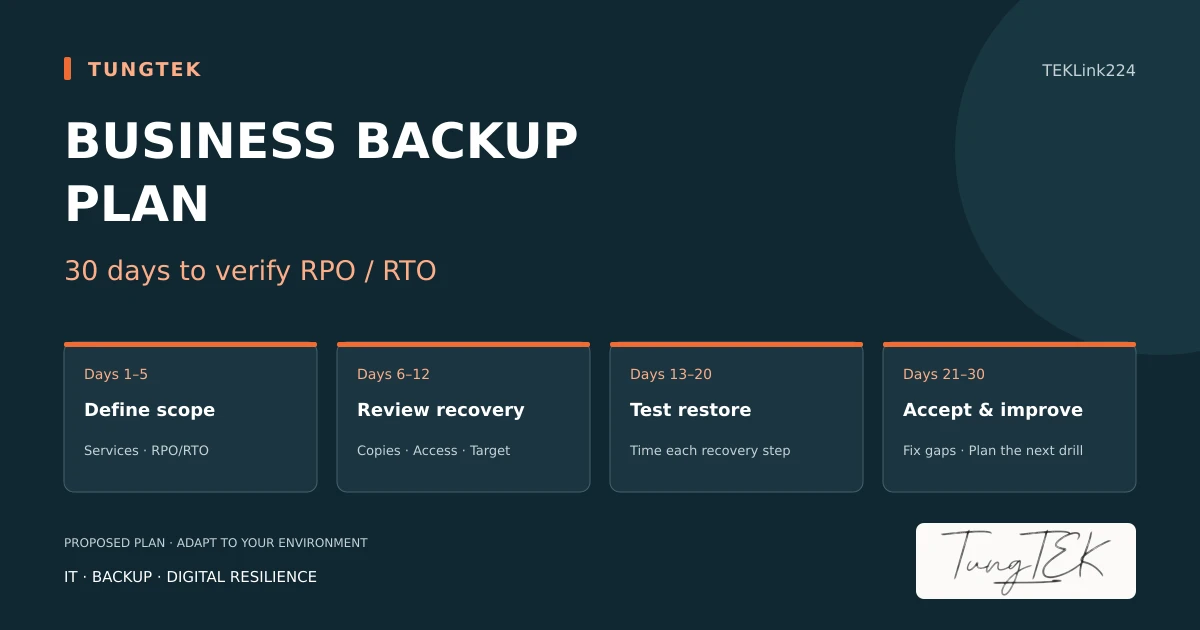
TUNGTEK proposes this starting schedule for a small group of priority services. Larger systems or complex dependencies may require more time. Complete the outputs rather than treating the dates as a guarantee.
| Stage | Participants | Work to complete | Reviewable output |
|---|---|---|---|
| Days 1–5: define scope | IT and business owners | Select three services, agree RPO/RTO and data scope | Service register, dependencies, owners and acceptance criteria |
| Days 6–12: review the recovery path | IT, DBA and implementation partner if needed | Check copies, permissions, retention, configuration and standby resources | Copy-location map and assigned gaps with due dates |
| Days 13–20: restore in isolation | Operators and substitutes | Build a separate environment, restore priority scope and time each step | Action log, recovered data point and errors |
| Days 21–30: accept and improve | IT, users and budget owner | Validate applications, fix failures and retest | Results, outstanding work and the next drill date |
Missing copies or unsafe access must be addressed before the relevant restore exercise. Assign an owner and due date to each issue, such as unavailable recovery keys or insufficient storage for the priority database.
7. Run a restore drill that users can accept
Simulate an unavailable primary system and restore into a separate environment. There is no need to disrupt production to test the procedure. Microsoft recommends isolated restore validation and comparison against recovery targets. [6]
Define scope and the simulated incident time. Record the service, data, RPO/RTO, operator and reviewer.
Check test conditions. Confirm destination, capacity and network isolation; prevent test applications from submitting transactions or syncing into production.
Access the prepared copy. Record any remaining dependence on production accounts or devices.
Restore data and dependencies. Capture start times, waits and completion milestones.
Validate the business workflow. Open the application, reconcile the selected data, test permissions and record gaps.
Assess results. Compare the actual recovered data point with the simulated incident and total interruption with the agreed RTO.
Fix and repeat. Assign failures, update the procedure and retest after material changes.
The record should identify scope, recovered data point, step durations, application results, unresolved issues and sign-off. A small database test cannot establish full-scale performance for a large data estate.
In a real ransomware incident, choosing a recovery point also requires assessing compromise evidence and preparing a clean environment. A technically successful restore does not prove that its data is malware-free or that the original cause has been resolved. [7]
8. Allocate budget to measured recovery gaps
Link each investment to an observed gap. If retrieval consumes most of the recovery window, review bandwidth, storage tier and the route back to the recovery environment. If files restore but the application does not work, address configuration, dependencies and operating instructions.
Include version retention, transfers, retrieval requests, recovery compute, licensing and drill time in total cost. Assign responsibility for alerts and failed jobs. The team must be able to operate, verify and adjust the chosen approach against agreed business needs.
TUNGTEK connects this work with Backup & Disaster Recovery planning, NAS deployment through TEKNas and Managed IT operations. Implementation scope and acceptance criteria depend on the individual system.
9. Common backup planning questions
Does a nightly backup meet a 15-minute RPO?
Nightly recovery points alone do not meet that target for continuously changing data. Choose a mechanism that creates suitable recovery points, then test the latest point actually recoverable. SQL Server log backup choices also depend on the recovery model. [4]
Must the entire NAS be restored before work resumes?
Prioritized recovery may work when applications, data structures and access permissions support it. Identify all necessary dependencies and obtain business agreement. Do not arbitrarily split databases or omit required files to improve a measured time.
How often should the drill be repeated?
Base the cadence on service importance and change frequency. Retest after material changes to backup software, storage, networking or applications. Put the next date in the drill record. [6]
10. Share experience at VIET NAM Backup Day 30.11
IT administrators, DBAs and business owners can bring a concrete question: which service must return, what RPO/RTO is needed, how much data must be restored and which step is slow. Tested restore results and the failures encountered are useful community contributions.
Join the VIET NAM Backup Day 30.11 Zalo group to discuss NAS, server, virtual machine, SQL and cloud backups. Share anonymized configurations and keep credentials, keys and customer data private. “30.11” follows the community activity’s name; it is not a claim of official observance.
Related reading: Ransomware.VN — Do not wait for ransomware to think about backups, covering protection layers and the 3-2-1-1-0 rule.
TBackup by TUNGTEK · IT | Backup | Data Recovery | Digital Resilience. Start with one important service and complete a restore that its users can accept.
References
Sources reviewed on 3 November 2026. The 30-day schedule, responsibility table and numerical illustrations are TUNGTEK editorial proposals to adapt to the actual environment.
Microsoft Learn — Business continuity, high availability and disaster recovery: RPO/RTO and business requirements.
Microsoft Learn — Redundancy, replication and backup: factors affecting backup recovery.
NCSC — Principles for ransomware-resistant on-premises backups: credential isolation and protection against modification/deletion.
Microsoft Learn — Transaction log backups: recovery models and log backup scheduling.
Microsoft Learn — Complete database restores, Full recovery model: database restore sequence.
Microsoft Learn — Reliability testing: isolated restore tests and target validation.
NCSC — Mitigating malware and ransomware attacks: checking backups and restoring to clean devices.